How an AI Secretary Handles Memory (Without Becoming a Junk Drawer)
A memory that only stores is a junk drawer. A memory that returns the right thing is a secretary. Here is the difference, in practical terms.

Secy
Personal AI Secretary
Our posts are written by the Secy team, with AI assistance and a human review before publishing.
The Problem With Saving Things
Every note app promises to be your second brain. Most quietly become a junk drawer.
You save the link. You jot the idea. You record the thought on a walk. Six weeks later you cannot find any of it, because saving was never the hard part. Retrieval is the hard part.
A secretary has always understood this. Filing something away is only half the job. Knowing where it is, and when to bring it back, is the other half, and the more valuable one.
What “Memory” Means for an AI Secretary
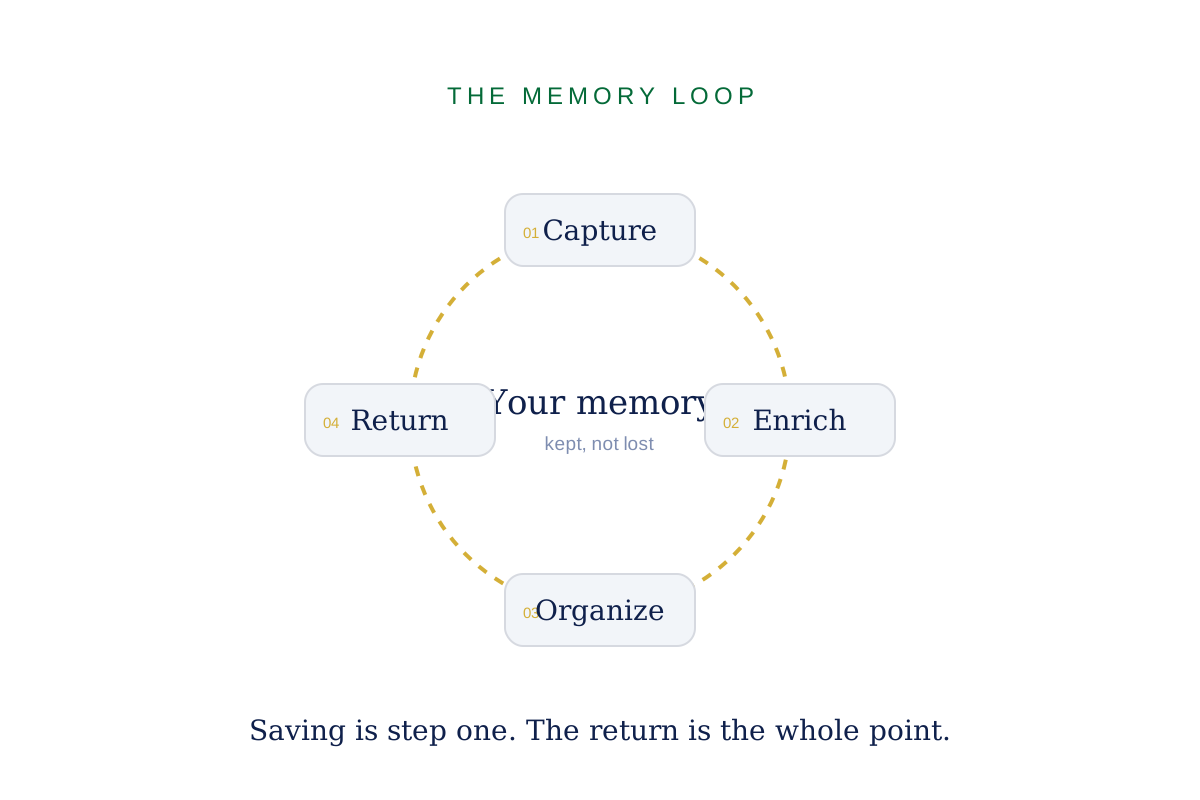
Memory is not one feature. It is a short pipeline:
- Capture. Get the thing out of your head and into the system.
- Enrich. Add context so it means something later.
- Organize. Tag and group it so it stays findable.
- Return. Bring it back when it is relevant.
Most tools stop after step one. A secretary is judged on steps two through four.
Step 1: Capture Has to Be Frictionless
If capturing takes more than a few seconds, you will not do it, and the system dies.
That is why the good tools put capture everywhere: a single button, a share sheet, a voice memo. Type a note, paste a link, record a thought. The point is to never lose the idea to the effort of storing it.
One honest note: most AI secretaries, including Secy, still rely on manual capture. Nothing is reading your inbox or your messages for you yet. Capture is fast, but it is yours to do.
Step 2: Enrichment Is What Makes It Useful
A raw saved link is nearly worthless in isolation. A saved link with a short summary and a tag can be found months later.
This is where AI earns its place in the pipeline. When you save something, a good assistant writes a brief take on it, pulls out the key points, and attaches the context that a future you will need. In Secy, saved items get a short “Secy’s take” shortly after capture, so a link is never just a link.
The value is not that the AI is clever. It is that it does the small piece of work you would never get around to.
Step 3: Organization You Can Actually Trust
Enrichment without structure still rots. The fix is boring and effective:
- Tags that stay consistent, so search works.
- Folders or groups by theme: work, health, finance, travel.
- Pinning for the handful of things you return to constantly.
The goal is not a perfect taxonomy. It is a system where you can find a thing without remembering exactly where you put it. If you have to recall your own filing logic, the system has failed you.
Step 4: The Return Is the Whole Point
This is the step that separates a memory from a graveyard.
At minimum, you should be able to search and find anything you saved, quickly and by meaning, not just by exact words. Beyond that, the best assistant brings things back on its own: a daily brief, a resurfaced note tied to today’s goal, a reminder attached to the thing you saved.
Be realistic about the boundary here. Most products, Secy included, return your memory when you look for it, and are still developing the fully proactive version. Search works today. Serendipity is coming.
Privacy Is Part of the Memory
A memory holds the private version of your thinking, which makes it the most sensitive data you have.
Encryption, local-first design, and clear control over what is stored are not premium features. They are the baseline for anything you trust with your unfiltered notes. We return to privacy in a dedicated post later in this series.
Final Thought
Anyone can build a place to dump files. A secretary builds a place where you find them again.
Capture is easy. The return is the craft.
Secy’s Memory keeps everything you save, tagged and enriched, and ready when you look for it. 👉 https://secy.io
More in AI Secretary


Start with a calmer morning.

From 500+ Beta Testers Reviews